If you are new to this term, you might be missing out on the most underrated traffic source on the internet. It is a powerful yet highly underrated platform to generate traffic for both businesses and bloggers. It is an alternative to Google, Amazon and Facebook. Read more about it in the blog, and understand how leveraging Pinterest SEO can help you build a strong source of traffic.
What is Pinterest?
Pinterest is a visual discovery engine that helps you find ideas like DIY guides, recipes, home and style inspiration, etc. It provides ample room for creativity and storytelling. The visual platform boasts more than 578 million active monthly users and gives you access to high-income, high-intent shoppers. 80% of weekly Pinners say that they feel inspired by the shopping experience on Pinterest.
What is Pinterest SEO?
96% of top searches are unbranded. It shows that Pinners are open to new ideas. So, you can optimise your Pinterest account and website to drive more organic or paid traffic. It is not similar to Google, but many classical SEO methods can still be applied to Pinterest.
Pinterest for SEO is important and can be divided into the initial steps to set up and make visible, and more sophisticated steps to grow, engage, and leverage the platform’s unique features.
1. Start with Basics
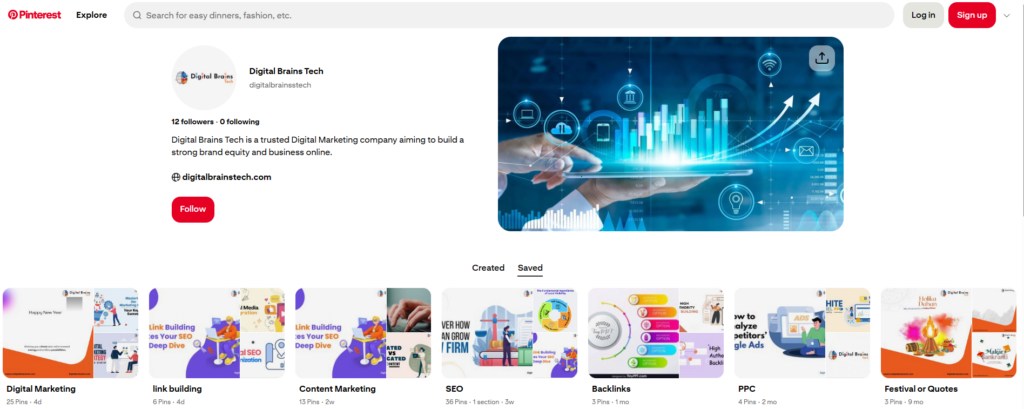
- Account Set up and Profile Optimization: Create a Pinterest Business account. If you have a personal account, simply convert it into a business account. Pinterest Analytics and Ads Manager are available with a business account.
- Select an SEO-friendly username: The username will be included in the URL, so choose a name that might interest your audience.
- Optimize Your Profile: Complete the ‘About You’ part with compelling information and a high-resolution logo. Make sure people can find and save your pins using keywords.
- Create a Board: Choose a name of a board that corresponds to your content, e.g.
2. Website Preparation and Connection
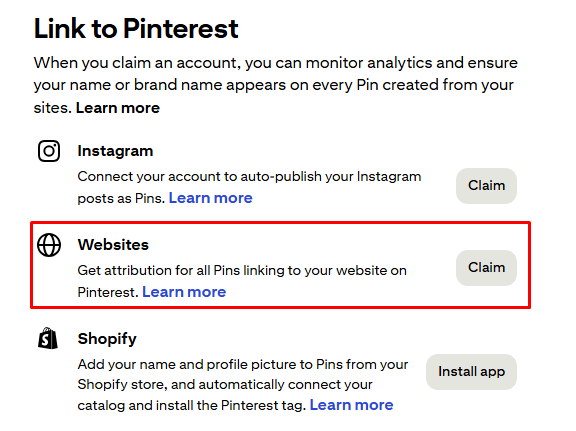
Connecting your site to Pinterest lets you monitor data and drive traffic back to your platforms.
- Add the Pinterest Tag: It is used to track conversions, segment audiences, and measure the performance of organic and paid campaigns.
- Add the Save Button: It is a quick HTML snippet that lets users pin pictures to their boards on your site or app, increasing visibility.
- Verify Your Site: After confirming ownership by the simple HTML code, add your profile picture to every pin.
3. Establish Conversion and Traffic Objectives
Lead times on Pinterest are longer than on Facebook and Google. Most importantly, remember that Pinterest users are open to exploring new things, so think like a customer of your brand/service. Meet people where they are. Does your target audience really find content like yours on Pinterest? How would it fit into your marketing strategy?
So, determine Pinterest’s position in your overall strategy and monitor impressions, traffic, and re-pins before attaching conversion goals to the tag.
4. Conduct Keyword Research

Your usual keyword list might not be a good fit for Pinterest SEO success. Pinterest is another search engine, so keyword research is essential for pin visibility.
- Use Guided Search: When the user enters a query, give him multiple suggestions semantically that are related to the search. It helps them narrow down their focus and get the relevant results without typing much. It also shows the most popular queries in that area.
- Explore Niche Topics: If you are mentioning your business on Pinterest, make sure it falls under the right category and sub-category of topics. Explore all topics relevant to your business and see how your competitive brands are doing it already and targeting keywords.
5. Clarity of Dimensions
To make your Pins SEO-friendly, learn how they look on the website. Also, know the anatomy of a pin. Pin structure, wording, fonts, sizes matter to move ahead of the competition. Have clear and optimized keyword-rich titles and think about having personal board cover images. Target long images 1,000 x 1,500 (2:3) pixels. Longer pictures receive more clicks on both mobile and desktop. Use high‑contrast colors. Include titles with keywords and a pin description of 100 characters, with target keywords and hashtags where appropriate.
Bonus: Pair your Pinterest strategy with professional link building services to strengthen your domain authority and increase the chances of your pins ranking on search engines.
6. Be Descriptive
You must get the descriptions right. Now Google is promoting to-the-point content and definitions for queries, and you can make a top-ranked spot by writing precise and concise descriptions, ideally with your target keywords. It helps to show your images in relevant searches, not only on Pinterest but also on other search engines too. The main reason behind it is that your description gives them a preview of what the content is about.
How to write ‘the description’?
- Explain how your content will benefit the audience and what they will learn.
- If promoting a product, share one unique or interesting fact that sets it apart from competitors.
- Keep the description short—2–3 sentences or around 100 characters is enough to convey value.
- Add relevant hashtags to boost visibility and help your content appear in related searches.
7. Schedule Pins for Consistency
- Pin consistently: Aim for at least five pins a day to maintain visibility and reach a wider audience.
- Use a scheduling tool: A reliable scheduling app helps plan pins, re-pin to multiple boards, share others’ content, and design customised pins.
- Link accounts: Connect Pinterest to your other social media platforms to build awareness among existing followers.
- Use strong visuals: Incorporate text overlays and appealing designs. Tools like Canva and other design apps can help create engaging pins.
- Track performance: Use Pinterest analytics to monitor organic reach and refine your keyword and design strategy.
8. Better Engagement

Pinterest for SEO is our key goal. So, once you are done with posting Pins, now aim for engagement. Teamwork enhances the reach in a short time.
- Join group boards: They are hosted on other creators and allow members to share content. Search boards that have multiple users: The scheduling apps will be able to pin your content automatically and re-pin the pins of members.
- Enlist the assistance of influencers: Invite the interested Pinterest influencers to co-create a board. By them re-pinning, your content becomes known to more people.
- Follow relevant boards: Following develops your group of friends, and increases pin distribution.
Tip: When businesses focus on Pinterest SEO, they often overlook how it supports their off-page SEO efforts too.
For example, brands that invest in the best guest posting services can amplify their Pinterest visibility by earning high-quality backlinks and increased brand exposure
9. Optimize for Visual Search

Pinterest Lens is one step ahead in the visual search just like Google Lens. It recognizes details of the picture and gets inspired by ideas by anything you point your Pinterest camera at. It enables one to ‘read’ an image and create an image thinking about aesthetics and keywords. Make sure you use quality and related images which are relevant to your blog or product page. This will raise your likelihood of appearing in the related item searches.
10. Try Pinterest Ads
If you want to drive organic traffic, try your hand at Pinterest Ads. They have powerful paid advertising capabilities. The ‘promoted’ Pins are paid to play. You can also offer multiple ad formats and let them choose from various formats such as image, video, clickable Pins, or collection of photos with product images.
Similar to a digital garden, the first step to optimizing a Pinterest profile is good soil: business profile, verified site, and keywords in the titles of the boards. The watering system and fertilizer, scheduling, influencer collaboration, and high engagement are the advanced tactics of growing pins, which attract the right audience with visual search and paid promotion.
TL;DR: Key Metrics to Track for Pinterest SEO
Start with the fundamentals—impressions, saves (re-pins), clicks, and traffic. These core metrics help you refine your design, keyword strategy, and content approach before adding conversion-focused goals.
SEO-Friendly Pin Requirements
Size: 1000 × 1500 px
Aspect Ratio: 2:3
Use vertical, long-form images—they perform best on both mobile and desktop and typically generate higher engagement and click-through rates.
Conclusion
Apart from creating aesthetically pleasing Pins, use Pinterest to strategically optimize discoverable and clickable content. Focus on keyword-rich descriptions, consistent Pinning, high-quality images and data-driven optimization.
If you’re already working with the best guest post writing services, request them to embed your top Pinterest boards or pins in relevant guest articles. This drives referral traffic and builds topic authority across multiple platforms.
Start small, stay consistent, analyse what works, and keep refining. With the right mix of creativity and SEO strategy, Pinterest can become a powerful traffic and brand-building channel for your business.